
Orders, reservations and sales in ITGallery
When someone buys
As soon as Stripe confirms the payment:
- You receive the email «New showroom sale: order SHW-… (amount)». It has the artwork, the buyer, the delivery (shipping with the address, or collection at the gallery), the buyer's comments and a link to the sale. If you reply to that email, it goes to the buyer.
- The buyer receives the purchase confirmation in the showroom's language, with the View your order button.
- ITGallery creates a draft sale with the provisional number
SHW-…:- the buyer as a contact with Showroom as the origin (if a contact with that email already existed, that one is used);
- the artwork as sold: if it has several editions, the first one available by number is sold (1/10 before 2/10);
- the payment recorded with the Stripe reference.
If the buyer does not pay, the artwork goes back on sale on its own after 30 minutes and nothing is created.
Sales › Online sales: orders from both channels
Showroom orders appear in Sales › Online sales, next to the orders from your website shop, if you have one. People with the orders permission or the «Online sales» permission can see them, even if the gallery does not have the Online sales add-on.
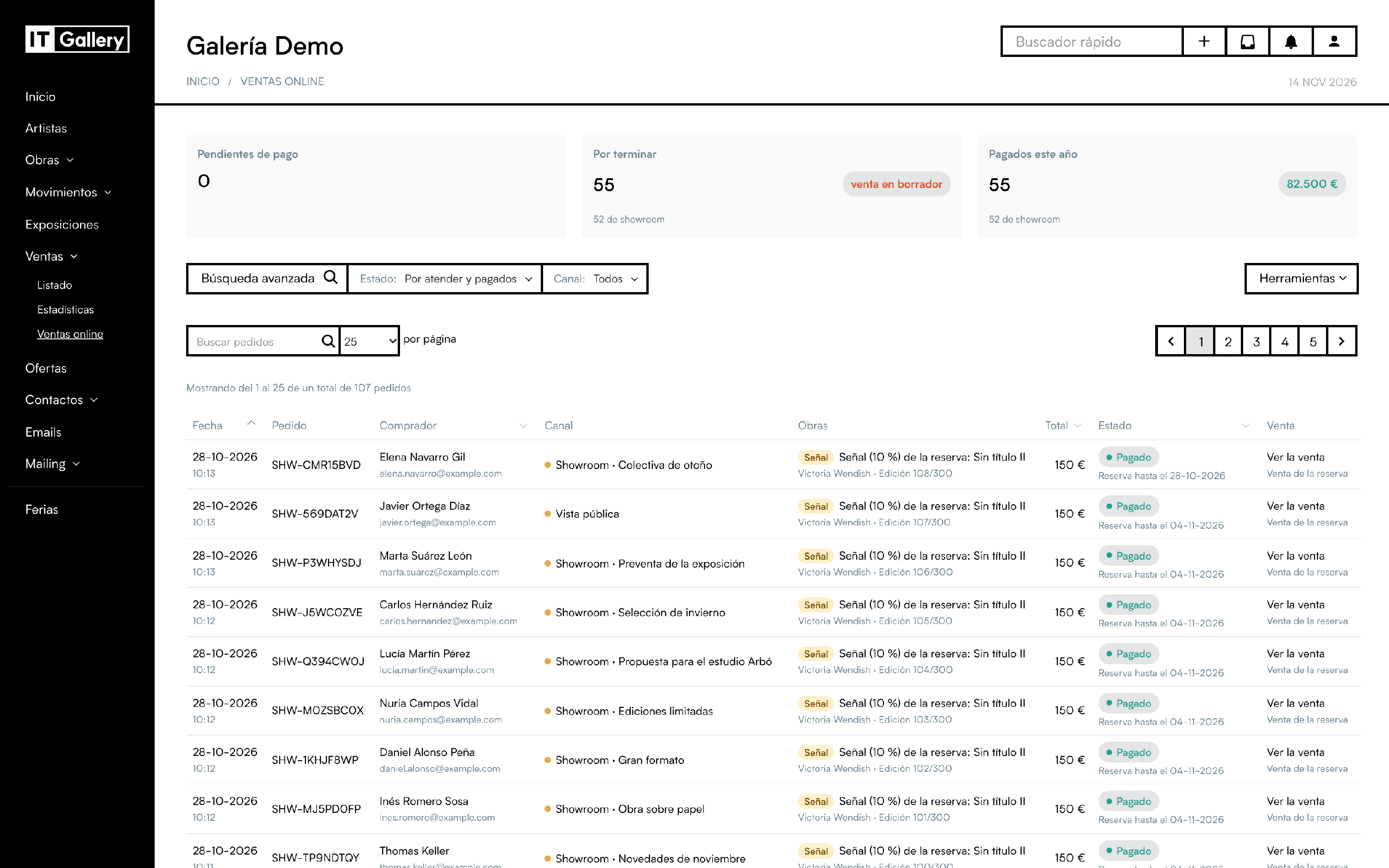
- The bar, like the one in artworks, contacts and sales: Advanced search on the left; then Status (with how many orders each one has) and Channel (All, Shop if you have the shop, or Showrooms); Tools on the right. The pagination is on the search row.
- Order: showroom orders have the same number the buyer sees,
SHW-…; orders from the shop have «#» and the short reference. The search box finds them by either. - Artworks: the artwork, the artist and the edition being sold: «Edition 1/3», «AP 1/2» or «Unique piece».
- Channel: Shop, Showroom · showroom name or Public view.
- The figures at the top count both channels and say how many orders come from showrooms.
- The statuses are the same as in the shop:
- pending payment: the buyer is on Stripe and the artwork is held;
- paid;
- paid without the artwork available: a rare case where you refund the amount from Stripe;
- expired;
- payment failed.
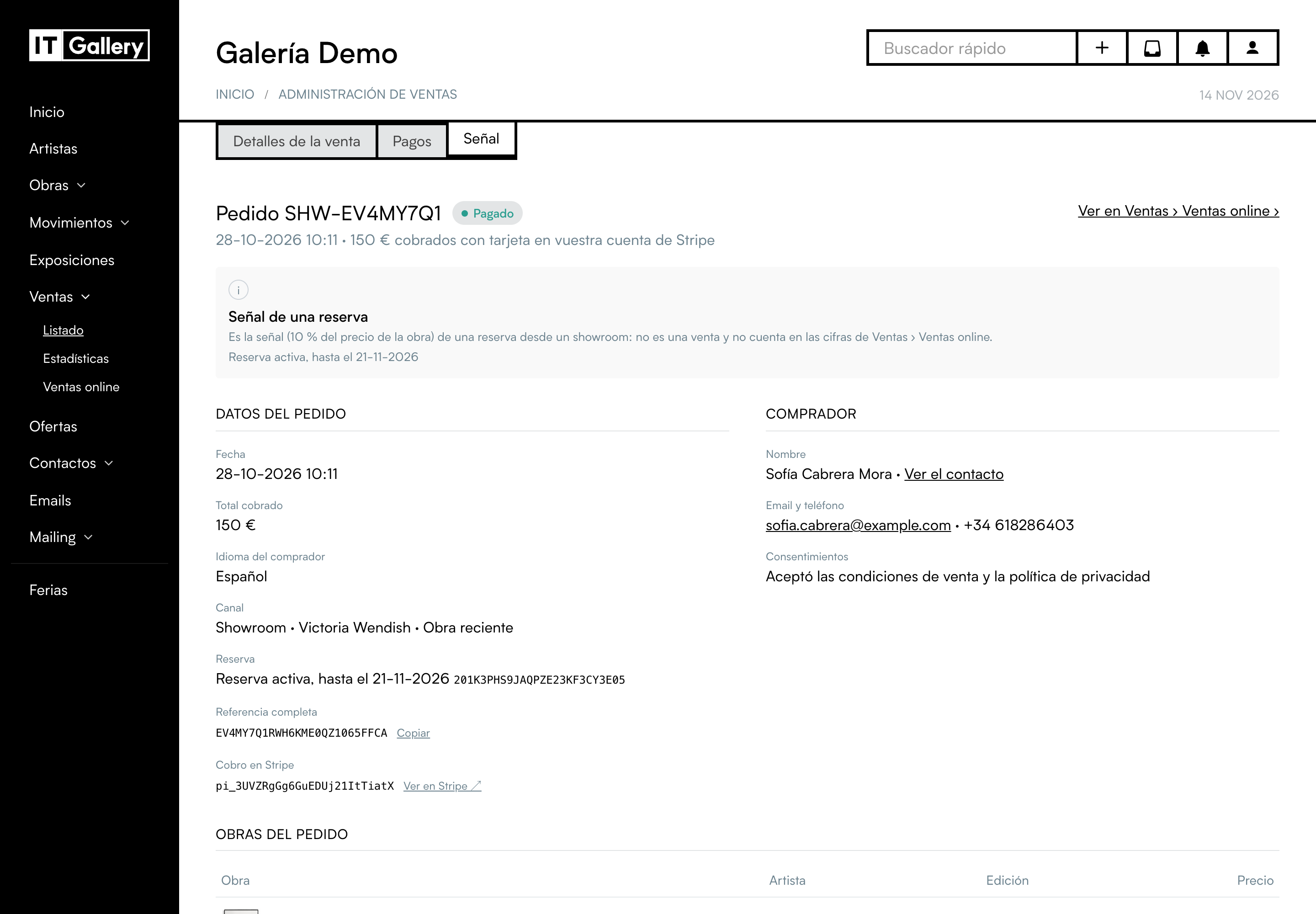
Deposits for reservations also appear here, marked as Deposit, with the reservation and its end date. They are not sales and are not counted in the figures.
Complete the SHW- draft sale
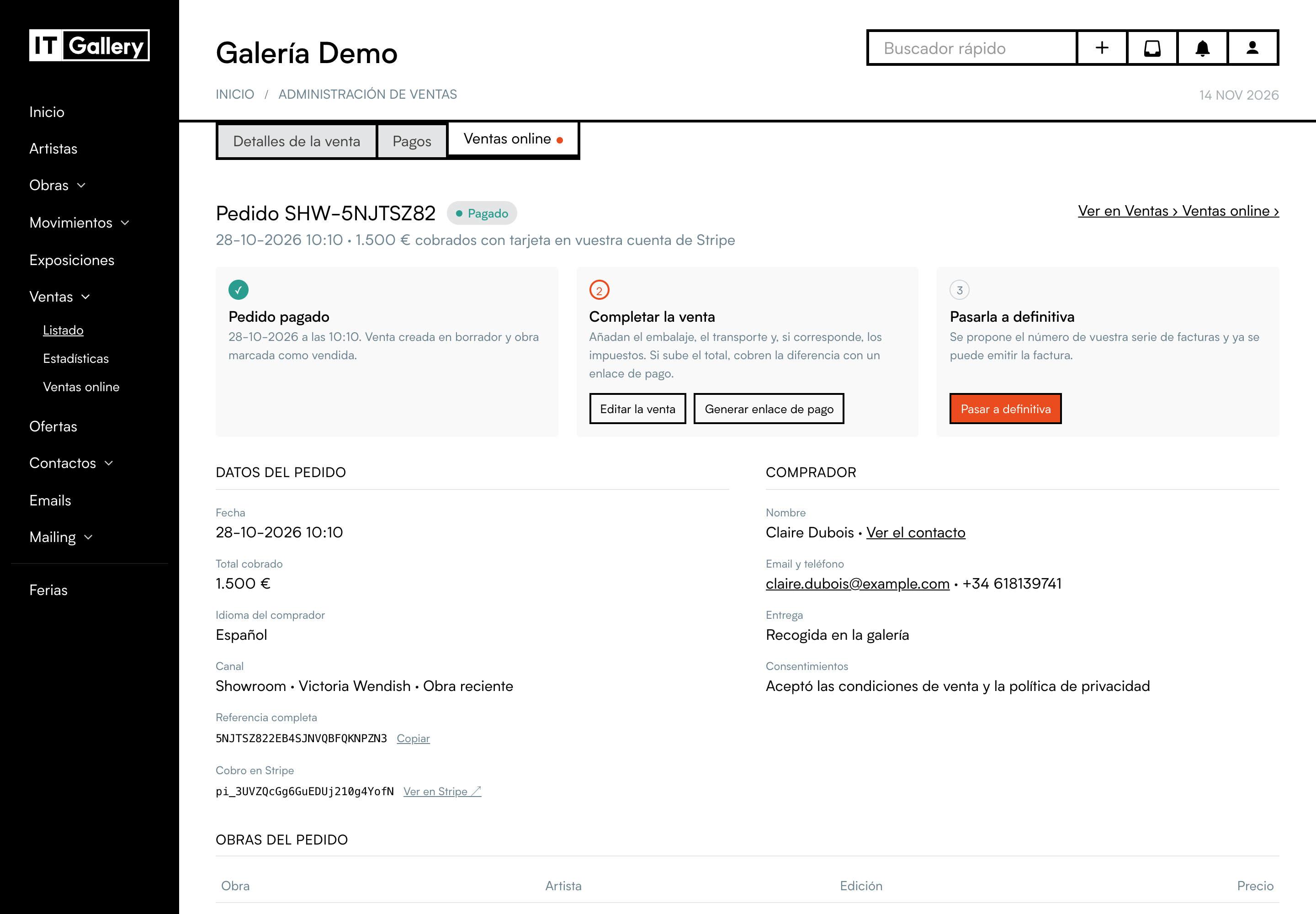
It works like a sale from the shop. The sale page has the Online sales tab (the same as in a shop sale), with the order, the buyer, the artwork and the three steps:
- Order paid ✓.
- Complete the sale: with Edit the sale, add packing, shipping and any applicable taxes. If the total goes up, charge the difference with a payment link from the sale.
- Make it final: when you save it as final, ITGallery suggests the next number in your invoice series instead of the provisional
SHW-…, and the invoice is issued.
Refunds: from your Stripe account (Payments → the payment → Refund), as in the shop. ITGallery records the refund in the sale.
Reservations
A reservation from a showroom or the public view always includes a deposit, which the buyer pays by card:
- While they pay the deposit:
- the artwork is held;
- Sales › Online sales shows the Deposit pending payment;
- if it is not paid within 30 minutes, the reservation is cancelled on its own and the artwork goes back on sale, with no charge.
- Once the deposit is charged:
- the artwork becomes «Reserved with payment», in the buyer's name, until the end date (the reservation appears in the reservations calendar);
- the «Reserved in Showroom» draft sale (
SHW-…) is created with the deposit payment; - that sale's page has the Deposit tab.
- The emails: you receive «New showroom reservation: artwork (until …)», with the deposit amount, and the buyer receives the reservation acknowledgement.
What you can do:
- Sell it: open the «Reserved in Showroom» sale, change its status and complete it like any other sale. The deposit is already charged in the sale, so only the rest remains to be charged.
- Release it early: refund the deposit from Stripe and cancel the reservation sale.
- When it ends without being sold: you both get an email, but the artwork stays «Reserved with payment» and the deposit is not refunded automatically. Decide with the buyer whether to:
- sell them the artwork;
- or refund the deposit from Stripe and release the artwork (by cancelling the reservation sale).
If you have already sold or released it in ITGallery, nothing is changed and nobody is emailed when it ends.
Enquiries and offers
Enquiries reach your email («Enquiry from showroom: artwork»), with the visitor's message. If you reply to the email, it goes straight to the visitor.
In Contacts, the visitor is saved as a prospect with Showroom as the origin, interested in the artwork and the artist. If the showroom creates offers, you will find it in Offers, with the artwork and the price.